
Every community has a ghost load.
It’s not the event you’re planning or the newsletter you’re writing. It’s the Slack notifications you scan at 11 p.m. The “quick question” DMs that arrive on Sunday. The mental tab you keep open for every member who might be struggling. The constant, low-grade awareness that something could go wrong while you’re offline.
Electrical engineers call this phantom load the electricity a device draws even when it’s switched off, just because it’s plugged in and waiting. Your TV, your router, your smart speaker. It doesn’t feel like usage. But it adds up on the bill.
Community building has the same problem. And most builders never calculate it until they’re already running on empty.
This essay won’t just name the problem. It’ll give you a way to measure your own always-on load and a few concrete ways to start reducing it this week.
A local organizer running a monthly workshop series and a B2B community lead managing a 2,000-person Slack have wildly different contexts—but the same invisible load.
For the local organizer, it’s the WhatsApp group that never sleeps. The “just checking in” messages. The member who needs a personal nudge to show up. The mental Rolodex of who knows who and who might hit it off.
For the B2B community manager, it’s the onboarding sequence that needs a human touch. The unanswered threads that sit for three days because you were traveling. The executive who wants a “quick dashboard” you have to build from scratch. The constant context-switching between platform admin, programming, member support, and internal advocacy.
The load isn’t just high. It’s always on. And it’s rarely counted.
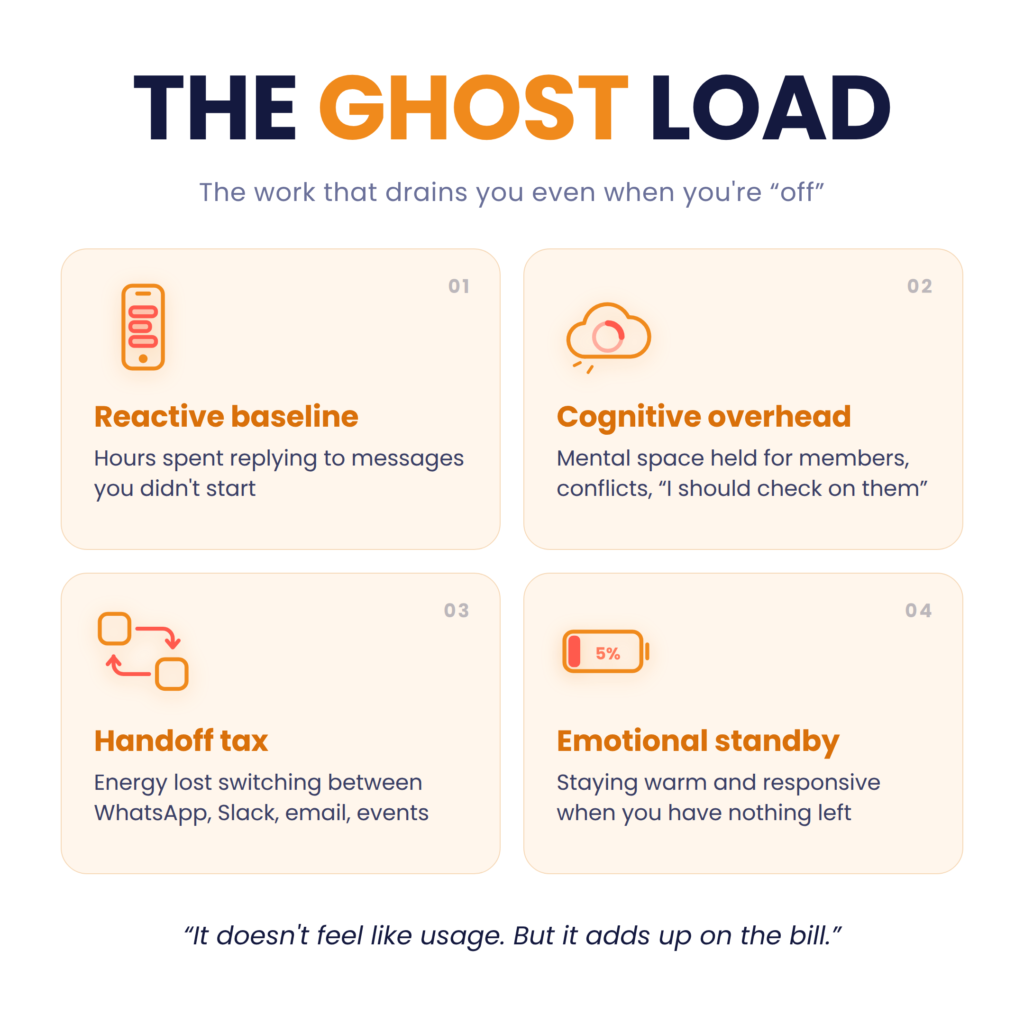
Most community metrics track output: messages sent, events hosted, members joined. An always-on load calculation tracks carrying cost—the energy your community consumes just by existing. It breaks into four buckets:
1. The reactive baseline. Hours per week spent responding to inbound messages, comments, and DMs you didn’t initiate. Not the strategic conversations. The triage. The “this could have been a FAQ doc” replies.
2. The cognitive overhead. The mental space reserved for member concerns, simmering conflicts, and “I should check on that person” pings. This is the phantom load of community work it draws power even when you’re not actively doing anything.
3. The handoff tax. Every time you switch between platforms—WhatsApp to Slack to email to the event platform—you pay a coordination cost. Treating engagement as “checking notifications” rather than scheduled, time-boxed blocks lets the always-on load dictate your rhythm.
4. The emotional standby. The energy required to stay warm, welcoming, and responsive even when you have nothing left. This is the load that never shows up in analytics, and it’s often the first thing that drains.
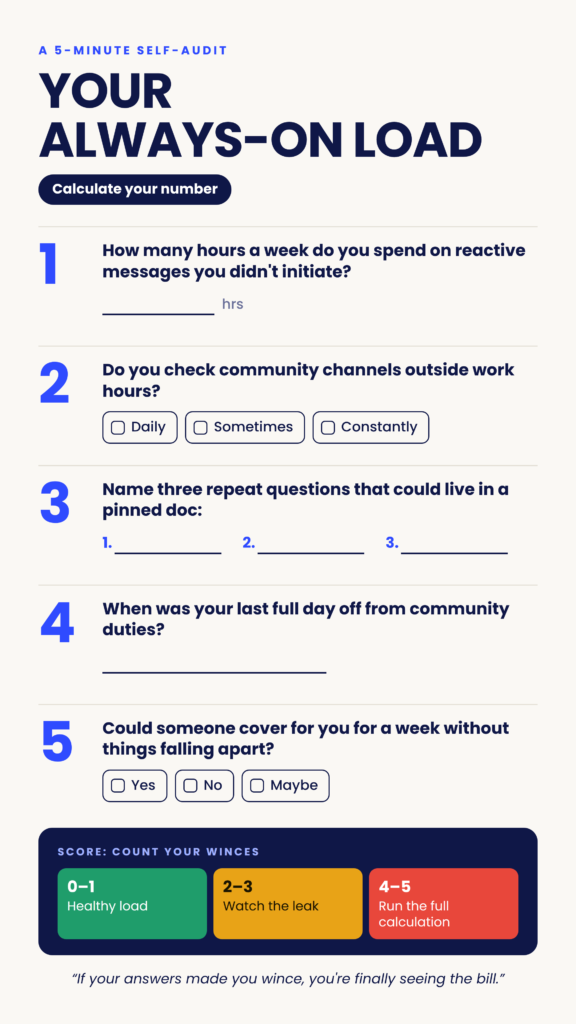
Before you track anything, answer these honestly. Set a timer for five minutes. Don’t overthink it.
How many hours per week do you spend on reactive community messages (replies, DMs, comments) that you didn’t initiate?
Do you check community channels outside your stated work hours? If yes, roughly how often—daily, a few times a week, constantly?
Can you name three questions members ask repeatedly that could live in a pinned doc, FAQ, or onboarding message instead of a live reply?
When was the last full day you took completely off from community responsibilities no checking, no lurking, no “just one quick look”?
If you had to hand your community to someone else for a week, could you—or does too much live only in your head?
If your answers made you wince, you’re not alone. You’re just finally seeing the bill.
Maria runs a 200-person local workshop community. She hosts one event per month, sends a weekly newsletter, and manages a WhatsApp group.
She tracked a normal week—not a launch week, not a crisis week. Here’s what she found:
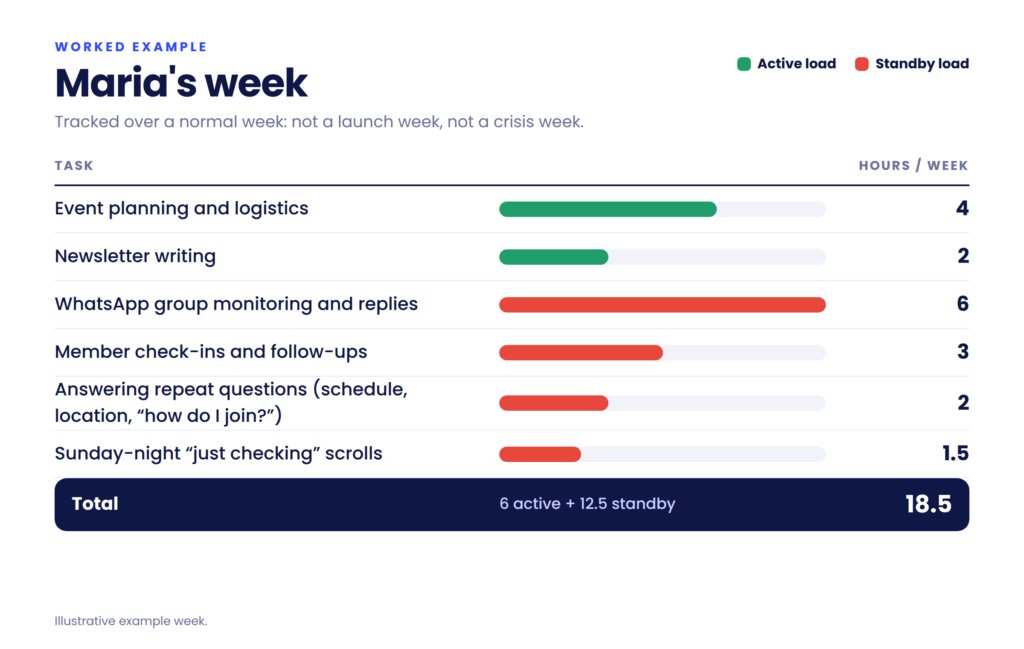
Maria’s fix was simple. She wrote a one-page FAQ and pinned it to the group. She set a rule: no WhatsApp replies before 9 a.m. or after 7 p.m. She asked two longtime members to help welcome newcomers. Within a month, her standby load dropped to about 7 hours. Same community. Same energy from Maria. Half the ghost load.
That’s the calculation. Not a spreadsheet with 47 tabs—just an honest week, sorted into what’s active and what’s standby.
The contexts differ, but the calculation is identical.
A local workshop organizer often discovers the “fun” part—the actual event—takes 20% of their community time, while coordination, reminders, and follow-up eat the other 80%.
A B2B community lead often finds that the onboarding flow built for scale is creating more manual work than it saves, because every new member triggers edge cases that need human judgment.
The number doesn’t tell you to stop caring. It tells you where the current is leaking and where a tool, a doc, or a boundary could carry the load instead of you.
1. Convert your top three repeat questions into a pinned resource. Every community has them. Write the answers once, pin them where members actually look, and stop paying the repeat-answer tax. This is the single fastest win, and it usually takes under an hour.
2. Set one async boundary and tell the community about it. “I respond to DMs between 9 and 5 on weekdays” is not a weakness. It’s a norm. Communities respect stated boundaries far more than they resent them. The organizers who burn out are the ones who never set any.
3. Name a second pair of hands. Pick one or two trusted members and give them a real role—welcoming newcomers, flagging questions, hosting a thread. Distributed moderation isn’t just scale. It’s load-sharing. And members who are invited into responsibility tend to become your most loyal people.
Notice what’s not on this list: doing less. The goal isn’t to shrink your community. It’s to stop spending your energy on the parts that were never human work to begin with.
An always-on load calculation sounds like a tool for cutting back. The real value is in seeing clearly.
When you know how much energy the invisible work is drawing, you can make deliberate choices. Automate the reminders. Save your personal touch for the member who actually needs it. Batch the admin. Protect the deep work. Build a team structure where moderation is shared before the founder is the only person holding the line.
The community builders who last aren’t the ones who work the most hours. They’re the ones who know which hours actually matter—and who have enough left in the tank to be present when it counts.
Plug in the numbers. Find the ghost load. Then decide what’s worth keeping on.