
Key Takeaway: Community building is shifting from brand marketing to systems architecture. The most scalable, resilient communities are managed by operations-minded leaders (Community Ops) who leverage automation, centralized member data, and structured workflows to drive member retention and clear ROI.
Community Operations (Community Ops) is the strategic discipline of designing the back-end workflows, data architecture, and automated systems required to run, scale, and measure a community.
While traditional community management focuses on front-facing tasks like content creation, public hosting, and social media outreach, Community Ops focuses on scalable infrastructure turning manual administrative tasks into automated processes that increase member retention and reduce organizer burnout.
For the past decade, community building was treated primarily as an extension of brand marketing. The standard playbook relied on charismatic hosts, high-volume outreach, and reactive event planning.
However, modern community management has hit a ceiling due to three critical structural challenges:
High Initial Member Churn: Members sign up after a high-energy launch event, but 60% drop off within 14 days because there are no clear, structured pathways for ongoing participation.
Severe Organizer Burnout: Community leads waste up to 80% of their operational bandwidth managing administrative drag—tracking RSVPs manually across spreadsheets, chasing ticket confirmations, and sending manual event reminders.
Unmeasurable ROI: Executive stakeholders demand retention and conversion metrics, but traditional community teams can only present vanity metrics like raw headcount or chat volume.
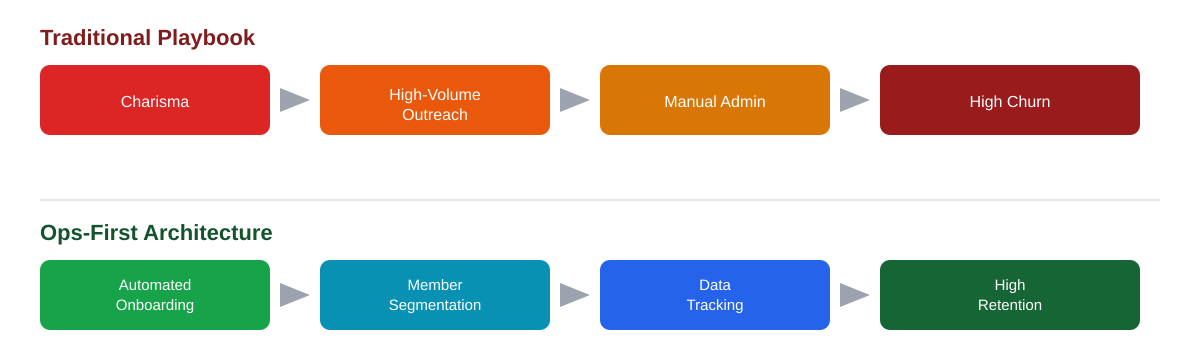
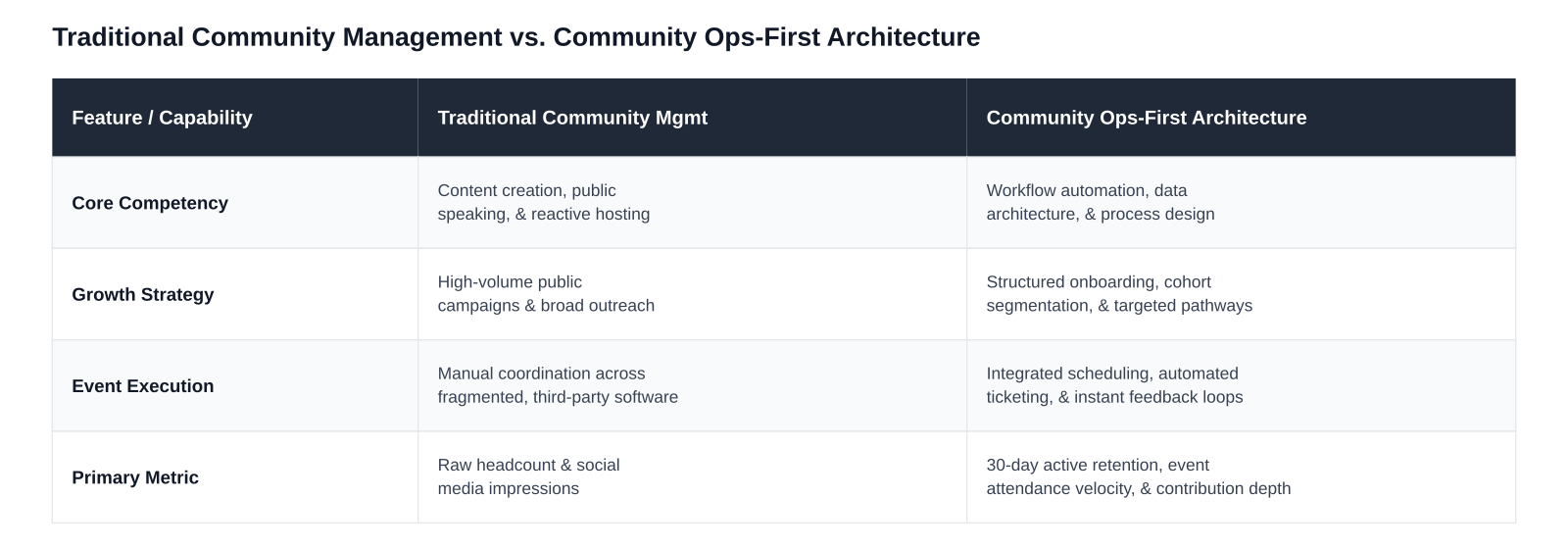
Operational leaders treat a community like a living, dynamic product. To build scalable infrastructure, community systems must be built upon four foundational pillars:
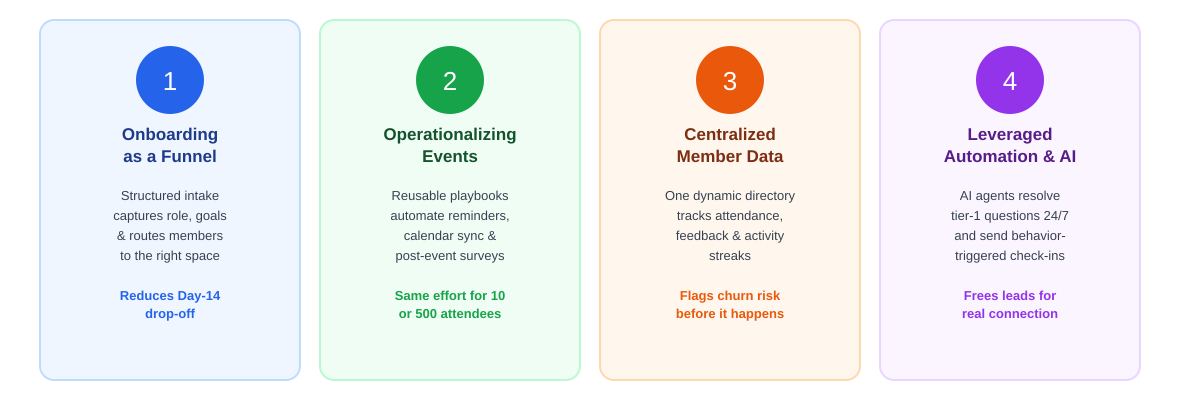
The highest percentage of member drop-off occurs within the first two weeks of joining. An operational framework replaces generic welcomes with a structured conversion funnel:
The Friction: Open, unmoderated group links invite spam, lower conversation signal, and cause immediate member ghosting.
The Ops Solution: Implement an automated intake workflow. Capture structured profile data (e.g., job role, location, primary goals) during entry. Use these attributes to automatically tag members, assign tier access, and route them to relevant focus circles or discussion threads immediately upon approval.
Events serve as the primary engine for community engagement, yet manual event workflows drain valuable team bandwidth.
The Friction: Creating event landing pages, updating rosters across tools, sending manual calendar links, and polling attendees creates extreme administrative overhead.
The Ops Solution: Deploy standardized, reusable event playbooks. Automate speaker on-boarding, calendar slot synchronization, multi-channel reminder cadences (e.g., 24 hours and 1 hour prior), and post-event survey distribution. Hosting a 10-person local workshop should require the exact same background effort as managing a 500-person conference.
When member data is fragmented across legacy spreadsheets, chat logs, email lists, and payment portals, personalizing engagement becomes impossible.
The Friction: Community teams operate blindly, unable to see who is active, who is disengaging, or who is ready for leadership roles.
The Ops Solution: Maintain a dynamic, centralized member directory. Monitor behavioral metadata including event attendance velocity, message history, feedback ratings, and active streaks—to flag churn risks before members leave and elevate power contributors early.
Administrative tasks should run silently in the background without requiring manual intervention.
The Friction: Managers waste hours answering repetitive logistical inquiries (“Where is the link?”, “Is this recorded?”, “How do I update my profile?”).
The Ops Solution: Deploy context-aware AI agents to resolve tier-1 queries 24/7, distribute post-session assets automatically, and send personalized engagement check-ins based on member behavior triggers.
Building a modern community infrastructure does not require stitching together dozens of disconnected software tools using fragile Zapier web-hooks and custom scripts. Tool fragmentation creates data silos, increases software expense, and degrades the user experience.
An optimal community stack unifies member identity, event workflows, native discussions, direct communication, and behavioral analytics into a single dashboard.
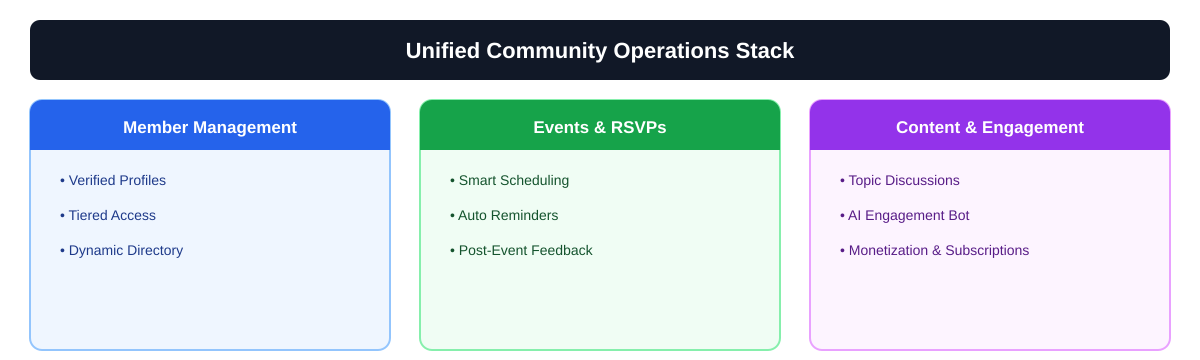
Platforms like Pinch highlight how modern operations workflows simplify this architecture. By unifying verified member on-boarding, dynamic member directories, automated event ticketing, and 24/7 AI engagement agents in one platform, Pinch eliminates back-end admin work. This allows community leads to reduce operational drag by up to 50% and focus their time on strategy and meaningful human connection.
Use this actionable execution matrix to systematically audit and upgrade your community’s operational infrastructure over the next four weeks:
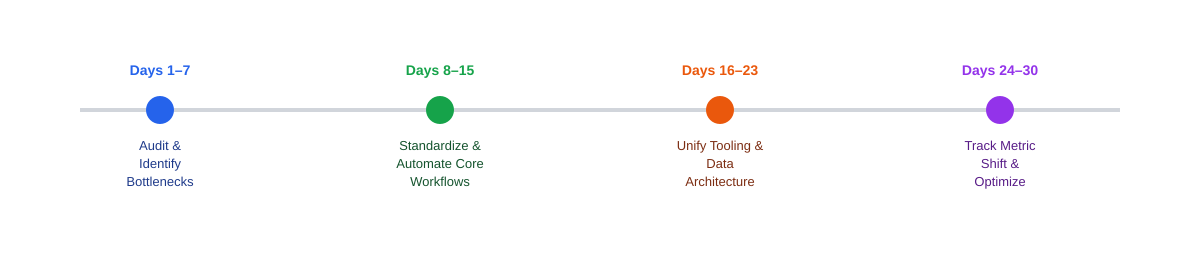
Map Time Allocation: Log all administrative community tasks for 5 consecutive business days.
Identify Redundancies: Flag any process performed manually more than 3 times (e.g., verifying join requests, sending reminder emails, exporting attendee CSVs).
Audit the Member Funnel: Map every step from discovery to Day 30. Pinpoint exactly where drop-offs occur.
Templatize Communications: Standardize welcome sequences, event notifications, and post-session follow-up messaging.
Automate On-boarding: Configure automatic approval rules, welcome triggers, and member profile tagging.
Set Up Event Triggers: Enable automated RSVP confirmations, calendar syncs, and timed reminder alerts.
Consolidate Tools: Transition disjointed third-party forms, event management, and member lists into an integrated platform like Pinch.
Enrich Profiles: Standardize metadata tagging based on skills, geography, engagement tier, and participation history.
Automate Feedback: Implement post-event rating prompts that collect attendee feedback automatically within 2 hours of session completion.
Transition Key Performance Indicators (KPIs): Replace vanity metrics with operational health benchmarks:
Event Conversion Velocity: Attendance Rate = (Actual Attendees ÷ Total RSVPs) × 100
30-Day Active Retention: Percentage of new members who complete at least one key interaction within 30 days.
Admin Drag Index: Total weekly hours spent on manual system administration vs. strategic member connection.
A Community Manager focuses primarily on member interactions, hosting events, creating content, and facilitating discussions. A Community Operations Manager focuses on the infrastructure—building the on-boarding funnels, managing member data, setting up tech stacks, and automating workflows that allow the community to scale.
Community Ops improves retention by eliminating friction during on-boarding, personalizing engagement through member data tagging, and automating timely follow-ups. Structured systems ensure that every member receives guidance and value within their first 14 days, reducing silent churn.
Rather than relying on total member counts, ops-first communities track operational metrics such as 30-Day Active Retention Rate, Event Attendance Conversion Rate (RSVP-to-Attendee ratio), Member On-boarding Completion Rate, and Admin Drag (hours spent on manual admin tasks).